Connections Architecture
This page explains how Playground connects to your third-party apps and to Microsoft 365. In every case the assistant acts as the signed-in user, and never with wider rights than that user has.
Scope
| Connection | Apps | Protocol | Access |
|---|---|---|---|
| MCP connectors | HubSpot, Notion, Pennylane, Pipedrive, Monday | The provider’s own remote MCP server | Read and write; writes need the user’s approval unless they set the tool to Allow |
| Microsoft 365 tools | SharePoint, Outlook mail, Teams messages, Teams meeting transcripts | Microsoft Graph | Read only; Outlook can also create drafts |
| SharePoint data sources | SharePoint sites chosen by your organisation | Microsoft Graph, background sync | Indexed for search; results filtered by each user’s own permissions |
Playground is an MCP client only: it connects to providers’ MCP servers and does not expose one of its own.
Architecture
MCP connectors
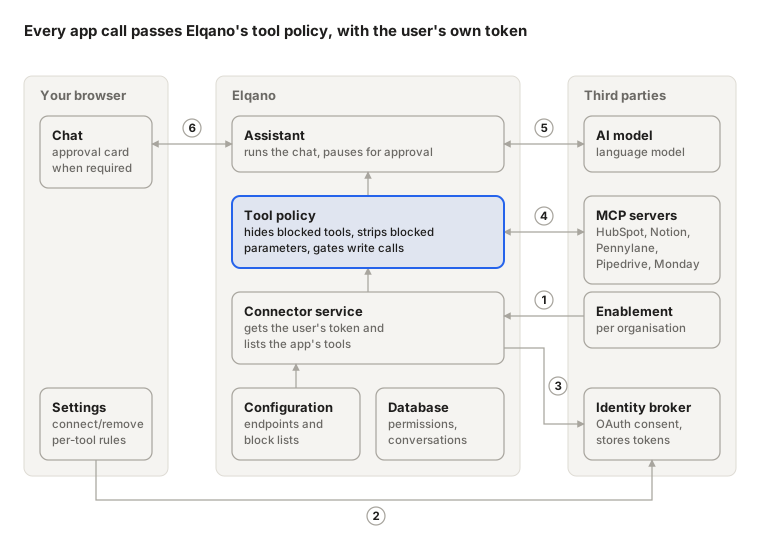
- Elqano enables each app for your organisation.
- The user connects an app from Settings → Connections and approves access on the provider’s own consent screen.
- On each message, Playground fetches the user’s current access token for that app.
- Playground lists the app’s tools and calls them through its tool policy.
- The AI model chooses which tool to call and writes the answer from the result.
- A call the provider does not mark read-only pauses on an approval card in the chat, unless the user has set that tool to Allow.
Microsoft 365
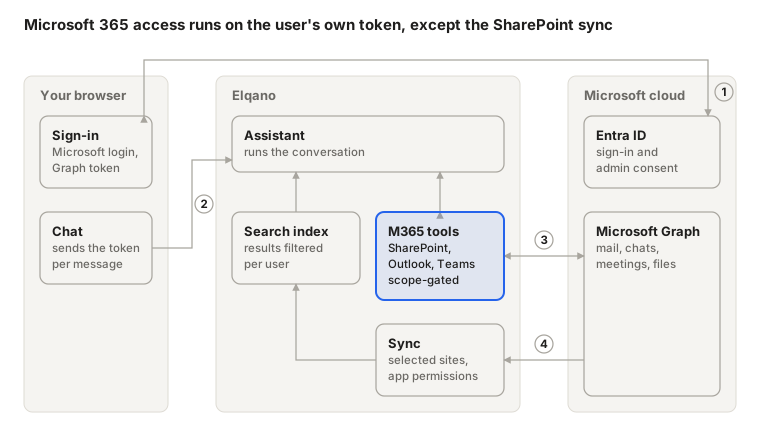
- The user signs in with Microsoft. Your Entra administrator consents to the permissions each capability needs.
- Each message carries the user’s delegated Microsoft Graph token.
- Tools call Microsoft Graph as the user, and only for the permissions that token holds. In Teams, the Teams token is exchanged on behalf of the user.
- A background sync reads the selected SharePoint sites with your organisation’s Entra app. Search results are checked against each user’s own SharePoint permissions.
Microsoft 365 permissions
Each capability is offered only when the user’s token holds all of its delegated permissions.
| Capability | Delegated Graph permissions |
|---|---|
| SharePoint | Sites.Read.All (requested at sign-in) |
| Outlook mail | Mail.ReadWrite |
| Teams messages | Chat.Read, ChannelMessage.Read.All, Team.ReadBasic.All, Channel.ReadBasic.All, Files.Read.All |
| Teams meeting transcripts | OnlineMeetingTranscript.Read.All, OnlineMeetings.Read, Calendars.Read, plus Graph access to transcripts in the Teams admin center (guide) |
Note
Playground never requests Mail.Send. The assistant can prepare a draft, but only the user can send it, from Outlook.
Connection lifecycle
Connections are set up once and checked again on every message, so changes made in Playground take effect from the next message.
| Step | MCP connectors | Microsoft 365 |
|---|---|---|
| Enable | Elqano turns the app on for your organisation | Your Entra administrator consents to each capability’s permissions |
| Connect | The user approves the app’s OAuth consent | The user signs in with Microsoft |
| Each message | Playground fetches the user’s token and lists the app’s tools | Playground reads the permissions in the user’s token and offers the matching tools |
| Disconnect | Remove access deletes the stored token and the user’s tool rules | Revoking consent in Entra removes the tools once the user’s Microsoft token is renewed |
An MCP tool call
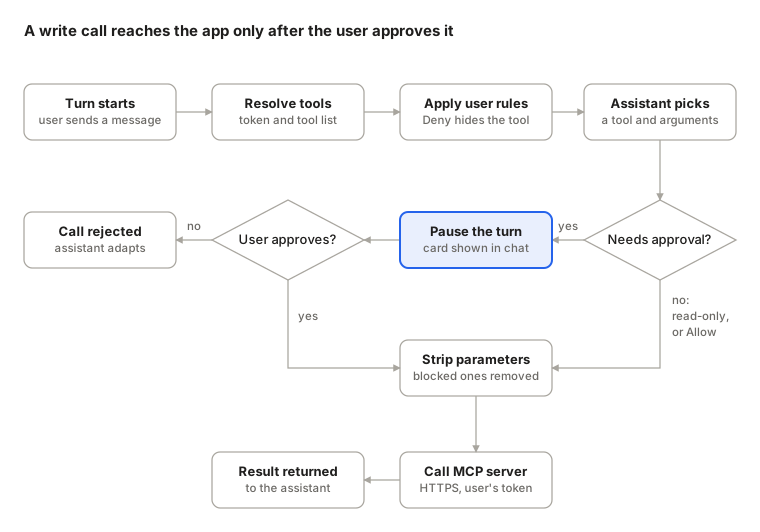
Whether a call pauses for approval depends on whether the provider marks the tool as read-only, overridden by the user’s own Allow, Ask or Deny setting for that tool. Microsoft 365 tools have no approval step, because they only read data or create Outlook drafts that the user sends themselves.
Authentication
| Path | Credential |
|---|---|
| MCP connectors | The user’s OAuth token for that app, held by Elqano’s identity broker and refreshed automatically |
| Microsoft 365, web app | The user’s delegated Graph token from Microsoft sign-in |
| Microsoft 365, Teams app | The Teams token, exchanged on behalf of the user for a Graph token |
| SharePoint sync | Your organisation’s Entra app, with application permissions |
Calls to the apps’ MCP servers and to Microsoft Graph use HTTPS. Permissions set at the provider always apply: Playground can narrow them, never widen them.
Data flow
Apart from SharePoint data sources, Playground fetches data when a tool is called and does not copy your apps’ data.
| Data | Direction | Stored in |
|---|---|---|
| Tool call arguments | Playground → app or Microsoft Graph | The conversation |
| Tool results (records, mail, messages, transcripts, files) | App or Microsoft Graph → Playground → AI model | The conversation |
| Documents from selected SharePoint sites | Microsoft Graph → Playground | The search index |
| Per-tool rules | User → Playground | The application database |
See Data Security & Management for where these stores run and how long data is kept.
Key security decisions
| Decision | Why |
|---|---|
| The user approves every MCP call that is not marked read-only, unless they have set that tool to Allow | OAuth consent says what the assistant may do, not what the user intends; third-party content can contain instructions |
| Each tool can be set to Allow, Ask or Deny, one tool at a time | The user, not the provider, has the last word; there is no bulk grant |
| Provider tools and parameters that would send conversation content to the provider are blocked | Your conversations stay in Playground |
| Provider tool descriptions cannot replace Playground’s approval step | A provider’s text cannot remove the user’s confirmation |
| Microsoft 365 tools use delegated access only, and none takes another user or mailbox as input | The assistant reaches only what the signed-in user can open |
| Outlook is limited to drafts; Teams is read-only | Nothing is sent in the user’s name without them |
| Microsoft 365 tools follow the permissions in the user’s current token | Revoking consent in Entra removes them once that token is renewed |
| A SharePoint search result is shown only after Microsoft Graph confirms the user can open it | The index is built with application permissions, so each result is filtered per user |
| Connections and tool rules are scoped to the organisation and the user | One user’s connections are never used for another |
Reliability
- If an app is unavailable or its token cannot be refreshed, only that app’s tools are skipped; the conversation continues, and Settings shows Access expired.
- Throttled Microsoft Graph requests are retried after the delay Microsoft asks for. A request that creates an Outlook draft is retried only when Microsoft refused it without running it, so a retry cannot create a second draft.
- If your tenant has not enabled Graph access to Teams transcripts, the assistant says so instead of retrying.
- A pending approval stays in the conversation, so the user can answer it later.